

Capacity requirements planning (CRP) compares, machine by machine and week by week, the hours of work your jobs will ask for with the hours each machine really has. In a CNC shop, it shows weeks in advance which machine will be overloaded and which will wait for work, while there is still time to act.
This guide explains what CRP is and how it differs from rough-cut capacity planning and from finite scheduling. It then shows how to calculate load, net capacity and machine load percentage. An example with 4 machines over 4 weeks shows how to fix the overloads. For the wider scheduling method, see production planning and scheduling for CNC shops.
What Is Capacity Requirements Planning (CRP)?
CRP compares two quantities for each work center and each period:
- Load: the hours of work that the planned jobs ask of the work center in the period, setups included.
- Capacity: the hours the work center really has in the same period.
The ratio between the two is the load percentage. Above 100%, the machine cannot do all the planned work in the period. Well below 100%, it will wait for work. The goal of CRP is to read these gaps early enough to fix them. The levers are well known: move jobs, change machines, plan overtime, outsource or renegotiate a date.
In manufacturing planning, CRP sits after material requirements planning (MRP) and before detailed scheduling. MRP decides which parts to make and when. Scheduling sets the exact order of operations on each machine. CRP answers a simple question in between: does the plan fit the machines and the hours we have? The result is often shown as a load vs capacity chart, also called a machine load chart: one bar per machine and per week, with a line at 100% capacity.
CRP vs Rough-Cut Capacity Planning vs Finite Scheduling
Three tools check capacity at different levels of detail:
| Tool | When it runs | What it uses | What it tells you |
|---|---|---|---|
| Rough-cut capacity planning (RCCP) | After the master production schedule, before MRP | Master schedule quantities and bills of resources, for a few key resources | Whether the plan is roughly feasible |
| Capacity requirements planning (CRP) | After MRP, on open and planned work orders | The routing of each order, with setup and run times | Which machine is overloaded, and in which week |
| Finite capacity scheduling | When building the schedule the floor will run | Real hours available per machine and per operator | A plan that never asks for more hours than exist |
Classic CRP uses infinite loading: it places each operation where the order dates say it should run, without checking whether the machine has the hours. That is why a CRP report can show a week at 125%. The overload is the output, and the planner fixes it. Finite scheduling works the other way and only uses hours that are really available.
A CNC shop also has a second layer: operator load. A machine at 70% can still be blocked if the operator who runs it is busy with setups on two other machines. For that layer, see lean workload balancing and the 5 indicators of operator workload.
How to Do Capacity Requirements Planning in 5 Steps
1. Choose the Horizon and the Time Bucket
The horizon is the period covered, and the time bucket is the length of each column. For a CNC job shop, a horizon of a few weeks in weekly buckets, for example 4 to 8 weeks, usually shows overloads early enough. The coming week is then reviewed day by day. Small buckets over a long horizon need precise dates that distant jobs do not have yet.
2. Calculate the Load From the Routing
The load of a job is calculated operation by operation, with its routing. For each operation: load = setup time + cycle time × quantity. Each operation loads the machine it runs on, in the period where it is planned.
Example: a job of 120 parts goes to the lathe first, then to the machining center.
| Operation | Machine | Setup | Cycle per part | Load |
|---|---|---|---|---|
| 10: turning | Lathe 1 | 1.5 h | 4 min | 1.5 h + 120 × 4 min (8 h) = 9.5 h |
| 20: milling | 3-axis VMC | 2 h | 6 min | 2 h + 120 × 6 min (12 h) = 14 h |
The job represents 23.5 hours, but it does not load the shop as one block. Lathe 1 gets 9.5 hours and the VMC gets 14 hours, often in different weeks. Adding these hours by machine and by period, for all open and planned jobs, gives the load of the plan. See manufacturing routing for CNC shops.
For jobs already started, count only the remaining load: the parts still to make and the operations not yet done. And keep in mind that the plan is only as good as the times. Standard times that are too low make an impossible plan look feasible. Compare them regularly with the actual times measured on the machines. See how to quote CNC jobs with standard times.
3. Calculate the Net Capacity of Each Machine
Gross capacity is the number of shift hours. A machine on one 8-hour shift, 5 days a week, has 40 hours; on two shifts, it has 80. Net capacity removes what is already known in advance:
- planned preventive maintenance (see how to build a preventive maintenance schedule from data);
- holidays and shutdowns;
- uncovered breaks, if the machine stops when the operator stops;
- test runs, first parts of new programs and hours reserved for other uses.
Net capacity = shift hours − planned downtime.
That leaves unplanned losses: breakdowns, waiting for material, minor stops. There are two ways to account for them. Either you keep standard times and reduce capacity with an efficiency rate observed on your machines, leaving out setups, which are already in the load. Or you correct the load with the actual times measured on the machines. What matters is to count each loss only once, or the plan will underestimate what the shop can do.
4. Calculate the Machine Load Percentage
Load percentage = load ÷ net capacity × 100.
A lathe that must absorb 46 hours in a week with 40 available hours is loaded at 46 ÷ 40 × 100 = 115%. To read the result:
- Above 100%: overload. The planned work does not fit in the period without action.
- Close to 100%: the plan fits on paper, but there is no margin for a breakdown, a rush job or a setup that runs long.
- Well below 100%: underload. The machine will sit idle unless work is added.
There is no universal threshold. The right target depends on how reliable your times are, how often rush jobs arrive and the role of the machine. An overload on the bottleneck delays the whole shop, while an overload on a lightly used machine is easier to absorb. See bottleneck analysis in CNC shops.
5. Read the Plan Machine by Machine, Then Act
The shop total is not enough. A shop loaded at 80% can have one machine at 120% and another at 50%. And the free hours of a lathe cannot run a milling operation. Read each row, mark every cell above 100% and every very low cell, then fix the overloads, starting with the nearest ones.
Build a plan that respects real capacity. An infinite-capacity plan assumes every machine can absorb everything. JITbase schedules at finite capacity, with your machines, your operators, their shift hours and your due dates.
See finite-capacity schedulingCapacity Requirements Planning Example: 4 Machines Over 4 Weeks
Take a shop with four machines: two CNC lathes, a 3-axis vertical machining center (VMC) that runs two shifts, and a 5-axis machining center. Their net capacity per week:
- Lathe 1 and Lathe 2: one 8-hour shift, 5 days, so 40 hours.
- 3-axis VMC: two shifts, so 80 hours.
- 5-axis machining center: 40 hours, except in week 3, when 8 hours of preventive maintenance are planned, so 32 hours.
Here is the load of the open and planned jobs, calculated from their routings, with the load percentage of each cell. Cells marked (over), in red, are above 100%. Cells marked (low), in yellow, are at 60% or less (a threshold chosen for this example):
| Machine | Net capacity | Week 1 | Week 2 | Week 3 | Week 4 |
|---|---|---|---|---|---|
| Lathe 1 | 40 h | 34 h (85%) | 38 h (95%) | 46 h (115%) (over) | 28 h (70%) |
| Lathe 2 | 40 h | 22 h (55%) (low) | 26 h (65%) | 30 h (75%) | 18 h (45%) (low) |
| 3-axis VMC | 80 h | 72 h (90%) | 84 h (105%) (over) | 64 h (80%) | 48 h (60%) (low) |
| 5-axis machining center | 40 h (32 h in week 3) | 30 h (75%) | 34 h (85%) | 40 h (125%) (over) | 24 h (60%) (low) |
| Whole shop | 200 h (192 h in week 3) | 158 h (79%) | 182 h (91%) | 180 h (94%) | 118 h (59%) (low) |
Over the four weeks, the shop is loaded at about 81%: 638 hours for 792 available hours. The total looks comfortable. The detail shows three overloads, on three different machines:
- Week 2, 3-axis VMC: 84 hours for 80, so 4 hours too many.
- Week 3, Lathe 1: 46 hours for 40, so 6 hours too many.
- Week 3, 5-axis machining center: 40 hours for 32, so 8 hours too many, because of the maintenance planned that week.
On the other side, Lathe 2 never goes above 75%, and all of week 4 is light. Without CRP, these overloads would be discovered during the week itself, when the only options left are overtime or late jobs.
The Planner's Decisions
Each overload is fixed with a different lever, always within the due dates:
- 3-axis VMC, week 2: move a job later. An 8-hour job, due at the end of week 3, moves from week 2 to week 3. Week 2 drops to 76 hours (95%), and week 3 rises to 72 hours (90%).
- Lathe 1, week 3: change machines. An 8-hour job that Lathe 2 can run (same bar capacity, program and tooling available) moves to Lathe 2. Lathe 1 drops to 38 hours (95%), and Lathe 2 rises to 38 hours (95%).
- 5-axis machining center, week 3: move the maintenance and start a job earlier. The 8 hours of preventive maintenance move to week 4, the lightest week, if the maintenance interval allows it. Week 3 gets its 40 hours of capacity back. A 4-hour job whose material is already in the shop starts in week 2. Week 3 drops to 36 hours (90%), week 2 rises to 38 hours (95%), and week 4 becomes 24 hours for 32 (75%).
The corrected load vs capacity plan:
| Machine | Net capacity | Week 1 | Week 2 | Week 3 | Week 4 |
|---|---|---|---|---|---|
| Lathe 1 | 40 h | 34 h (85%) | 38 h (95%) | 38 h (95%) | 28 h (70%) |
| Lathe 2 | 40 h | 22 h (55%) (low) | 26 h (65%) | 38 h (95%) | 18 h (45%) (low) |
| 3-axis VMC | 80 h | 72 h (90%) | 76 h (95%) | 72 h (90%) | 48 h (60%) (low) |
| 5-axis machining center | 40 h (32 h in week 4) | 30 h (75%) | 38 h (95%) | 36 h (90%) | 24 h (75%) |
| Whole shop | 200 h (192 h in week 4) | 158 h (79%) | 178 h (89%) | 184 h (92%) | 118 h (61%) |
No cell is above 100% anymore, and the total load has not changed: still 638 hours. Three remarks:
- Week 3 stays tight on the lathes, at 95% each. A rush turning job that week will need overtime or will have to wait. Sales should know this before promising a date (see on-time delivery in CNC shops).
- Lathe 2 stays underloaded in weeks 1 and 4, like the 3-axis VMC in week 4. These are the right weeks to accept short jobs, start jobs early or place maintenance. They are also good weeks to train an operator (see the skills matrix for CNC shops).
- CRP does not set the sequence. It says the work fits in the week. The order of operations, hour by hour, is set afterwards in the schedule, for example on a production Gantt chart.
The numbers are an illustration. In a real shop, check the operator load too. Moving a job from Lathe 1 to Lathe 2 does not help if the Lathe 2 operator is already busy elsewhere that week.
What to Do About Overloads and Underloads
When Load Exceeds Capacity
Try the levers in this order, from cheapest to most expensive:
- Move a job later, to a lighter period, without passing its due date.
- Start a job earlier, in a valley before the peak, if the material and the previous operation are ready.
- Change machines, to a machine that can run the operation, with the program, tools and an operator available.
- Move planned downtime (maintenance, test runs) to a lighter period, if its interval allows it.
- Plan overtime or an extra shift, decided in advance rather than discovered during the week.
- Outsource an operation, counting the time for shipping and inspection.
- Agree on a new date with the customer, as early as possible.
If a machine is overloaded week after week, the problem is no longer scheduling but capacity. The levers then become shorter setups, shorter cycle times, an extra shift or an investment. See how to increase production capacity.
When Capacity Exceeds Load
The free hours of an underloaded machine are lost if nothing fills them. They can be used to:
- accept short jobs or rush orders;
- start later jobs early, if the material is ready and it does not create useless inventory;
- place preventive maintenance, test runs and the prove-out of new programs;
- train an operator on the machine;
- tell sales which parts run on that machine.
When peaks and valleys alternate from one day to the next rather than from one week to the next, the right tool is leveling. See heijunka and production leveling in CNC shops.
Building a Load vs Capacity Chart in Excel
Many shops start in Excel, and it is a good way to learn the method. A simple workbook has three tabs:
- Operations: one row per job operation, with the machine, the planned week, setup, cycle, quantity and calculated load.
- Capacity: one row per machine, one column per week, with the net hours.
- Load chart: a machine × week grid. A SUMIFS formula adds the load from the first tab and divides it by the capacity from the second. Conditional formatting colors the cells above 100%.
The workbook becomes hard to maintain when:
- the plan changes several times a week and every change must be re-entered;
- standard times are never corrected with actual times;
- the progress of jobs in process is not updated, so the remaining load is wrong;
- you also need to track operator load, shift hours and skills;
- several people edit the file at the same time.
To decide when to move to a scheduling tool, see Excel vs CNC scheduling: your tipping point.
CRP, Gantt Charts, Heijunka and Capacity Planning
These tools look alike, but each one answers a different question, at a different level of detail:
| Tool | Question it answers | Usual time bucket |
|---|---|---|
| Capacity requirements planning | Does the planned work fit the capacity of each machine? | The week, over several weeks |
| Production Gantt chart | Which operation runs on which machine, and at what time? | The hour or the shift |
| Heijunka (leveling) | How do we spread the load evenly from one day to the next? | The day, over the week |
| Long-term capacity planning | Do we need more machines, shifts or people? | The month or the quarter |
| Schedule attainment | Did we run the plan? | The day or the week, after the fact |
For more on each tool, see the production Gantt chart, heijunka in CNC shops and schedule attainment in CNC shops.
Capacity Requirements Planning With JITbase
JITbase builds a finite-capacity schedule from your work orders and their routings. That schedule only uses the hours really available on each machine and for each operator, and the load vs capacity view comes straight from it:
- Planned load by machine, day by day and week by week: you see the load of each machine for the coming week and the weeks after. Overloads show up before they reach the floor.
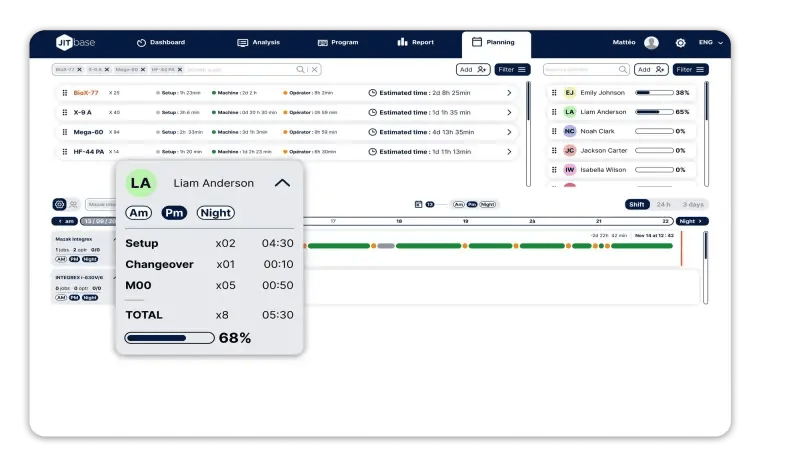
- Planned load by operator and by shift: setups, changeovers and M00 stops are counted for each operator. Shift hours and skills are taken into account.
- Drag and drop: you move an operation to another period or another machine and see the effect on the load right away.
- Actual times from the machines: setup and cycle times are collected by job, so the calculated load moves closer to reality week after week.
The Planning screen below shows the operator view: the planned load of one operator for one shift, with setups, changeovers and M00 stops counted.
Your team still decides what to move, what to outsource and which date to offer the customer. JITbase shows the effect of each decision on the machines and on the operators before the week starts.
See the load of every machine before it overflows. JITbase schedules at finite capacity and lets you move an operation with a drag and drop when a week becomes overloaded.
See smart schedulingKey Takeaways
- Capacity requirements planning compares planned load with net capacity, machine by machine and week by week.
- Load comes from the routing: setup time plus cycle time multiplied by quantity, for each operation.
- A shop loaded at 80% overall can hide several overloaded machines: read every row.
- Classic CRP shows overloads but does not fix them. Fix them early, with the cheapest lever first: move, start early, change machines, then overtime or outsourcing.
- The plan is only as good as the times: correct standard times with actual times from the machines.
Find out what a late-discovered overload costs. Estimate the value of less unplanned overtime, fewer idle machines and fewer late orders in your own shop.
Calculate your return on investmentFrequently Asked Questions
What is capacity requirements planning?
Capacity requirements planning (CRP) is the process of checking whether the work in your plan fits the capacity of each work center, period by period. It takes the open and planned work orders, uses their routings and time standards to turn them into hours, and adds those hours by machine and by week. The result is a load profile that you compare with the available hours.
Its purpose is to see problems early. CRP shows, weeks in advance, which machines will be overloaded and which will run out of work, while there is still time to move a job, change machines, plan overtime or warn a customer. It does not set the exact order of operations on each machine. That is the job of detailed scheduling and dispatching.
How do you calculate machine load percentage?
Machine load percentage equals the planned load divided by the net capacity, multiplied by 100. The load is the sum of setup and run hours of the operations planned on the machine in the period. The net capacity is the shift hours minus planned downtime, such as preventive maintenance, holidays or test runs.
For example, a lathe that must absorb 46 hours of work in a week with 40 available hours is loaded at 115%. Above 100%, the work does not fit in the period without action. Close to 100%, the plan fits on paper, but there is no margin left for a breakdown or a rush job. The right target depends on how reliable your times are and on the role of the machine in the shop.
What is the difference between CRP and rough-cut capacity planning?
Rough-cut capacity planning (RCCP) runs earlier and at a higher level. It checks the master production schedule against a few key resources, to see whether the plan is realistic before the material plan is calculated. It works from gross master schedule quantities and does not take into account the work orders already released or the inventory on hand.
CRP runs later, after material requirements planning has turned the master schedule into work orders. It starts from the open and planned work orders and the routing of each one, so it loads every work center with setup and run times in the periods where the operations are planned. RCCP answers whether the plan is roughly feasible, and CRP shows exactly where and when each machine will be short.
What is the difference between load and capacity?
Load is what you ask of a resource: the hours of work needed to run the planned operations. It comes from the work orders and their routings, which means setup time plus cycle time multiplied by quantity. Capacity is what the resource can deliver: the hours during which it is really available to produce.
Both are expressed in the same unit, hours, so they can be compared. Load changes with orders, and capacity changes with shifts, holidays and maintenance. CRP compares the two period by period. When load exceeds capacity, you must act on one or the other: move or reduce the load, or add capacity with overtime or an extra shift.
Is capacity requirements planning finite or infinite?
Classic CRP uses infinite loading. It places each operation in the period where the order dates say it should run, without checking whether the machine has the hours. That is why it can show weeks at 115% or 125%: the overload is the output, and the planner is expected to fix it by hand.
Finite capacity scheduling works the other way. It only places work in hours that are really available on each machine and for each operator, and it moves what does not fit to another slot or another machine. Many shops use infinite CRP to see the size of the problem over several weeks, and a finite schedule to build a plan the floor can actually run.
What do you do when load exceeds capacity?
Start with the levers that cost almost nothing: move a job to a lighter period without passing its due date, start a job earlier in a valley if the material and the previous operation are ready, or move an operation to another machine that can run it. Moving planned downtime, such as preventive maintenance, to a lighter week can also free capacity.
If that is not enough, use the levers that cost money: overtime or an extra shift decided in advance, outsourcing an operation, or a new date agreed early with the customer. If the same machine is above 100% week after week, the problem is no longer scheduling but capacity: reduce setups, cut cycle time or add hours on a lasting basis.