


MRP and MES are often mentioned together, yet they answer different questions. Planning is the lifeblood of manufacturing: without a sound plan, products are not produced and shipped on time, and the shop risks becoming an unreliable link in its clients’ supply chain. MRP builds that plan weeks and months ahead, MES follows its execution on the shop floor, and neither one decides how the day will actually be run by the operators.
In short:
- MRP plans materials and work orders in the medium and long term. MES tracks execution and work in progress on the shop floor.
- Neither is designed to monitor manual tasks such as part changeovers, planned stops (M00) or quality checks, which weigh heavily on daily scheduling.
- JITbase adds a short-term layer: it captures those manual tasks, predicts each operator’s workload and updates the expected completion of work orders in real time, without replacing your MRP or MES.
MRP vs MES: what each system does
ERP (enterprise resource planning) is a modular system that consolidates the information needed to run the business. All departments work in a single system, which digitizes processes, including planning based on customer orders.
MRP (material requirements planning) handles material requirements, inventory management and procurement scheduling. It manages delivery timing and builds the production schedule needed to meet demand. An MRP is either a module of the ERP or a third-party system connected to it, and it is designed for the users in related departments, mainly planners.
MES (manufacturing execution system) is often coupled with the MRP to bring “live” updates from the shop floor. It helps track work in progress, calculate OEE and manage resource and operator schedules. Its updates are only as live as its data source, though: if the MES is not connected to the machines and relies on operator scanning, the plan is updated at the end of a cycle or a shift.
| Question | MRP | MES | JITbase |
|---|---|---|---|
| Main question answered | What to buy and make, and by when? | What is happening on the shop floor? | How do we run the day to deliver the plan? |
| Time horizon | Weeks and months | Real time, current shift | Hours and days |
| Typical user | Planner | Production manager | Supervisor |
| Data source | Orders, forecasts, inventory, routings | Operator scans and, if connected, machine data | CNC machine data and programs, history, operator inputs at the machine |
| Manual tasks (changeovers, M00, checks) | Not modeled in detail | Not designed to monitor them | Captured and used for planning |
| Typical output | Work order priorities and material availability | Work in progress, OEE, execution status | Operator allocation, workload per operator, live completion estimates |
For a broader comparison of MES and ERP, see our guide on MES vs ERP.
What MRP and MES miss for daily scheduling
Modern MRP systems do not take one element into account in enough detail for daily scheduling, even when coupled with an MES: the human element. Although MRP and MES systems do include operators in their models, they are not designed to monitor the manual tasks performed during production.

In CNC machining, many tasks happen while machines are active: part changeovers, planned stops (M00) to remove chips, change the part position, perform tool changes or quality controls, and optional stops (M01), usually used during the first-off but sometimes activated by operators in production. MRP and MES systems do not account for these tasks accurately when planning and scheduling.
The consequences show up on the shop floor every day:
- Uneven operator workload. Some operators perform many manual tasks throughout the day while others stand next to a machine waiting for it to finish.
- Hard-to-optimize allocation. Without precise data on manual tasks, it is difficult to optimize how operators and machines are managed.
- No real-time view of the plan. If the MES is not connected to the machines, plans are updated by operator scans, so supervisors cannot easily tell whether there is a problem on the shop floor or whether jobs will be completed on time.
See what your machines are really doing. JITbase connects to your CNC machines and shows production, setups and stops in real time, so your plan starts from measured data.
Explore production monitoringHow JITbase adds a short-term planning layer
JITbase is a real-time planning and scheduling tool connected to your CNC machines. It includes labor management thanks to a layer of data on manual tasks that MRP and MES systems cannot access. Based on your CNC programs and historical data, JITbase captures the setup, part changeover and M00 (planned stops) of your programs and integrates them into the planning of operator allocation.
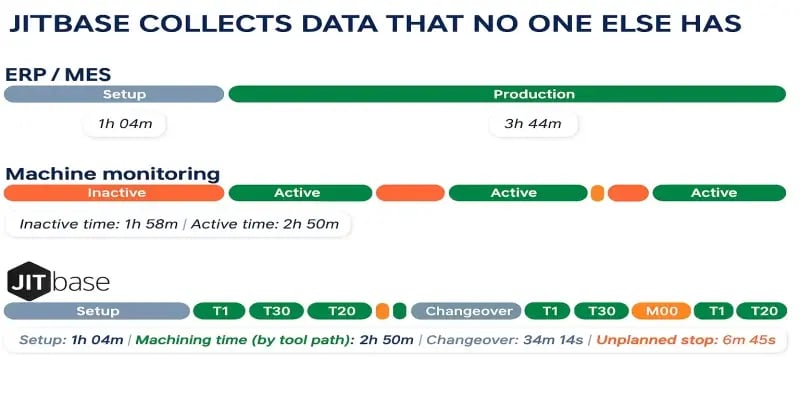
JITbase focuses on the daily scheduling of jobs and the allocation of operators to machines, with the goal that operators are neither over- nor under-utilized. It can also show where one operator can cover several machines, based on the manual operations each machine requires. The benefits for the supervisor are concrete:
- Workload prediction. Because the duration of manual tasks is captured, JITbase predicts the workload of operators on their assigned machines, which helps supervisors make better allocation decisions.
- Precise manual-task data. Instead of tracking only high-level downtime, JITbase automatically knows which tasks take longer than expected.
- Real-time updates. The progress and performance of work orders are monitored in real time, which makes adjustments possible during the shift.
- Up-to-the-minute completion estimates, based on the live progress of both machining and manual task duration.
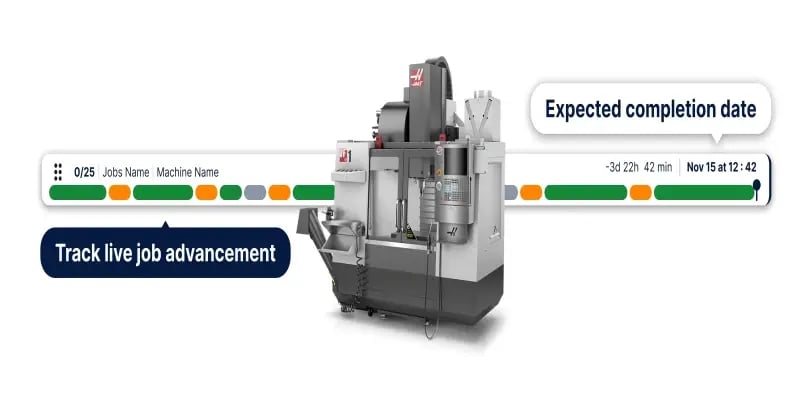
With JITbase, you can visualize the machining and manual tasks of several machines and see whether they fit well together. You can also calculate the workload of your operators for a shift and reallocate operators with a low workload to other machines. By taking both the machine and the human factor into account, JITbase predicts the end of a production run more accurately, which gives you more confidence in your ship dates. For tactics on balancing the load, see our lean workload balancing playbook.
How MRP, MES and JITbase work together
JITbase does not replace your MRP or your MES: it is complementary to them. Your MRP still provides the best priority in which to complete work orders to meet deadlines. JITbase helps you determine whether the allocation of work and resources on your CNC machines is the best one, and whether there will be potential bottlenecks. MRPs are used by planners to plan the work orders to execute based on demand and deadlines while ensuring material availability, and JITbase is used by supervisors to allocate jobs and operators to machines and to track the progress of the plan in real time.
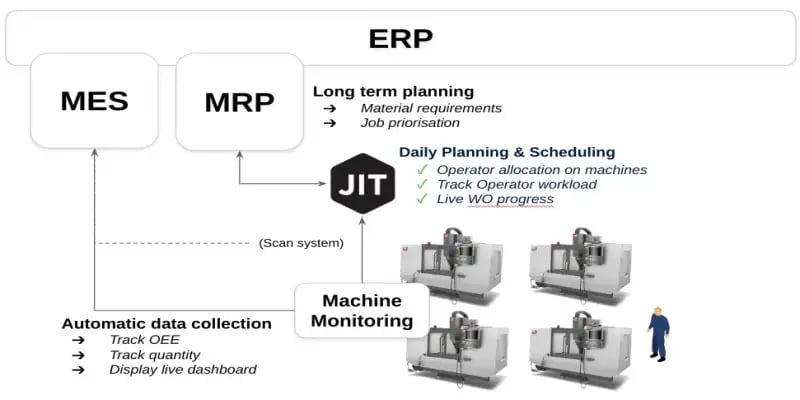
In practice, the flow looks like this:
- The ERP and MRP set the medium and long-term plan: materials, procurement and work order priorities.
- The supervisor uses JITbase to turn that plan into a daily sequence and an allocation of operators to machines.
- Data collected directly from the CNC machines, plus the manual tasks confirmed at the machine, update the progress of each work order in real time.
- If a problem arises, the supervisor adjusts the allocation and the schedule during the shift instead of discovering the delay at the end of it.
Connecting shop-floor data to the rest of your systems is a topic in itself, covered in our guide to integrating shop-floor data with your ERP. For the full picture of how planning levels fit together, see the production planning and scheduling guide.
Balance operator workload with live data. JITbase schedules jobs and allocates operators from real machine data, so your MRP plan is delivered with the people you have.
Explore scheduling and workforce managementWhen do you need a short-term scheduling layer?
An MRP and an MES are enough for many tasks, but a daily scheduling layer becomes worth considering when you recognize these situations:
- The MRP plan is sound, yet dates are missed because the daily sequence and operator allocation keep changing.
- Operators run several machines, and the manual workload of each machine is unknown.
- Setups, changeovers and quality checks take longer than the standard times used in the plan.
- Supervisors discover delays at the end of a cycle or a shift, when it is too late to reallocate.
The bottom line
JITbase and your MRP and MES systems work together to optimize production planning: the MRP on the medium and long-term plan, and JITbase on the short-term (hourly and daily) plan. By gathering data directly from the CNC machines and interpreting the manual tasks performed by operators, JITbase captures an extra layer of information about your production capability that MRP and MES systems cannot access by design.

Thanks to this extra layer, you can allocate operators to machines more effectively, get up-to-the-minute updates on the progress and performance of production, and quickly adjust the allocation and the schedule when problems arise.
What would better scheduling be worth? Estimate the return of a more balanced operator workload and more reliable ship dates with your own production data.
Calculate your ROIFrequently Asked Questions
What is the difference between MRP and MES?
MRP (material requirements planning) looks forward. It turns customer orders and forecasts into a plan: what to buy, what to make, and when, so that materials and capacity are available weeks or months ahead. MES (manufacturing execution system) looks at the present. It collects what is happening on the shop floor, such as work orders in progress, machine status and production counts, and it often calculates OEE and tracks work in progress.
In short, MRP answers “what should we make and by when?” while MES answers “what is happening right now?”. Neither one is designed to decide which operator should run which machine this afternoon, which is the gap a short-term scheduling layer fills. A shop does not choose between MRP and MES so much as decide how the two, plus a daily scheduling tool, share the work.
Does JITbase replace my MRP or MES?
No. JITbase is complementary. Your MRP keeps setting the priority in which work orders must be completed to meet delivery dates, and your MES, if you have one, keeps tracking execution. JITbase takes that plan as its input and helps supervisors deliver it: it shows whether the allocation of jobs and operators on the CNC machines is workable, and where bottlenecks are likely to appear.
Because it does not duplicate what the MRP and MES already do, JITbase can be introduced without replacing them. The planner stays in the MRP, the supervisor works in JITbase for the shift, and the real progress observed on the machines gives everyone a more realistic picture of whether the plan will be met.
Can MRP or MES handle daily operator allocation?
It depends on the system, but in most shops they handle it only partly. An MRP plans at the level of materials, work orders and machine capacity, not individual operator tasks. An MES can track resources and operator schedules, but it usually relies on what operators scan or declare, often at the end of a cycle or a shift, and it rarely knows how long manual tasks such as part changeovers, planned stops or quality checks really take.
Daily allocation needs that detail. If operators run several machines, the useful question is how much manual work each machine will demand during the shift and whether the tasks overlap. Without durations for those tasks, the allocation is a guess, and some operators end up overloaded while others wait next to a machine.
How does JITbase know how long manual tasks take?
JITbase is connected to the CNC machines and reads the programs and the history of past runs. From that data it captures setups, part changeovers and planned stops (M00) and uses them to estimate how long each job will really occupy a machine and an operator. At the machine screen, operators also confirm tasks and enter stop reasons, which adds context that the controller alone cannot provide.
As the shift progresses, the estimates are updated with the live progress of both machining and manual tasks, so the expected completion time of a work order reflects what is actually happening. Because the estimates draw on historical data, repeat jobs are planned from what really happened on previous runs rather than from standard times alone.
How do I know if my shop needs a short-term scheduling layer on top of MRP and MES?
Look for three signs. First, the MRP plan is sound but the shop still misses dates because the daily sequence and the allocation of operators keep changing. Second, some operators are overloaded with setups, changeovers and checks while others spend part of the shift waiting for a machine cycle to finish. Third, supervisors learn about delays only at the end of a cycle or a shift, when it is too late to reallocate.
If this sounds familiar, the problem is probably not the MRP or the MES but the missing hourly and daily view between them. A good first step is to measure the manual task time on a few machines for a couple of weeks, compare it with the operator load you assumed, and see how much capacity the current allocation leaves unused.