
MTBF is one of the simplest reliability metrics a CNC shop can calculate. It only helps if the number is based on clean shop-floor data and a clear definition of failure. For shop managers, operations managers, and production planners, mean time between failures can turn vague machine downtime into something measurable: expected uptime, likely interruption frequency, and better maintenance timing. Done well, it helps small shops plan capacity without padding every schedule “just in case.” This guide shows how to calculate MTBF from real machine and maintenance records, how to avoid common data mistakes, and how to use the result in day-to-day planning.
TL;DR:
-
Define “failure” before touching the data, or the MTBF result won’t mean much across shifts, machines, or jobs.
-
Divide observed operating time by the number of failures, keep planned downtime out of the operating time, and collapse duplicate alarms so one real stop doesn’t become several failures.
-
Treat MTBF as one input, not the whole answer; pair it with MTTR, downtime reasons, and planner feedback before changing maintenance schedules.
What Is Mean Time Between Failures (MTBF) and Why It Matters for Small CNC Shops
For a repairable asset such as a CNC mill or lathe, MTBF estimates the average operating time between one failure and the next. That makes it directly useful for small and mid-sized shops where one machine outage can wreck a day’s schedule. A planner who knows a machine’s historical mean time between failures makes better calls. Where to load urgent work, how much slack to leave in a week, and when to schedule inspections all depend on it.
Operational Value in Production Planning
In practice, MTBF helps answer questions like these:
-
How often does this machine fail during actual production time?
-
Which machines can safely carry the highest-priority jobs?
-
Which assets need closer inspection before a weekend or overtime shift?
-
How much unplanned downtime should be built into a realistic schedule?
It also supports spare-parts planning. If one spindle-related stop appears every few hundred operating hours while another machine rarely fails, stocking policy shouldn’t be the same for both. MTBF won’t tell a shop what to buy on its own, but it gives a starting point for reorder logic and maintenance reviews.
How MTBF Relates to Throughput and Staffing
There’s also a staffing angle. Frequent short failures create operator interruptions, supervisor calls, setup delays, and schedule reshuffling. That hidden work matters. Shops trying to understand operator burden may also want an operator workload diagnostic so reliability issues aren’t mistaken for labor inefficiency.
MTBF should be read next to other reliability metrics. MTTR (mean time to repair) shows how long recovery takes. Failure rate shows how often events occur per hour or cycle. And OEE gives a broader view of availability losses. Shops that track only MTBF can miss an ugly reality: a machine may fail rarely but take a long time to recover. MTBF is commonly used as a reliability indicator, but it still needs context from the system and conditions being measured.
Capture the breakdown data MTBF depends on
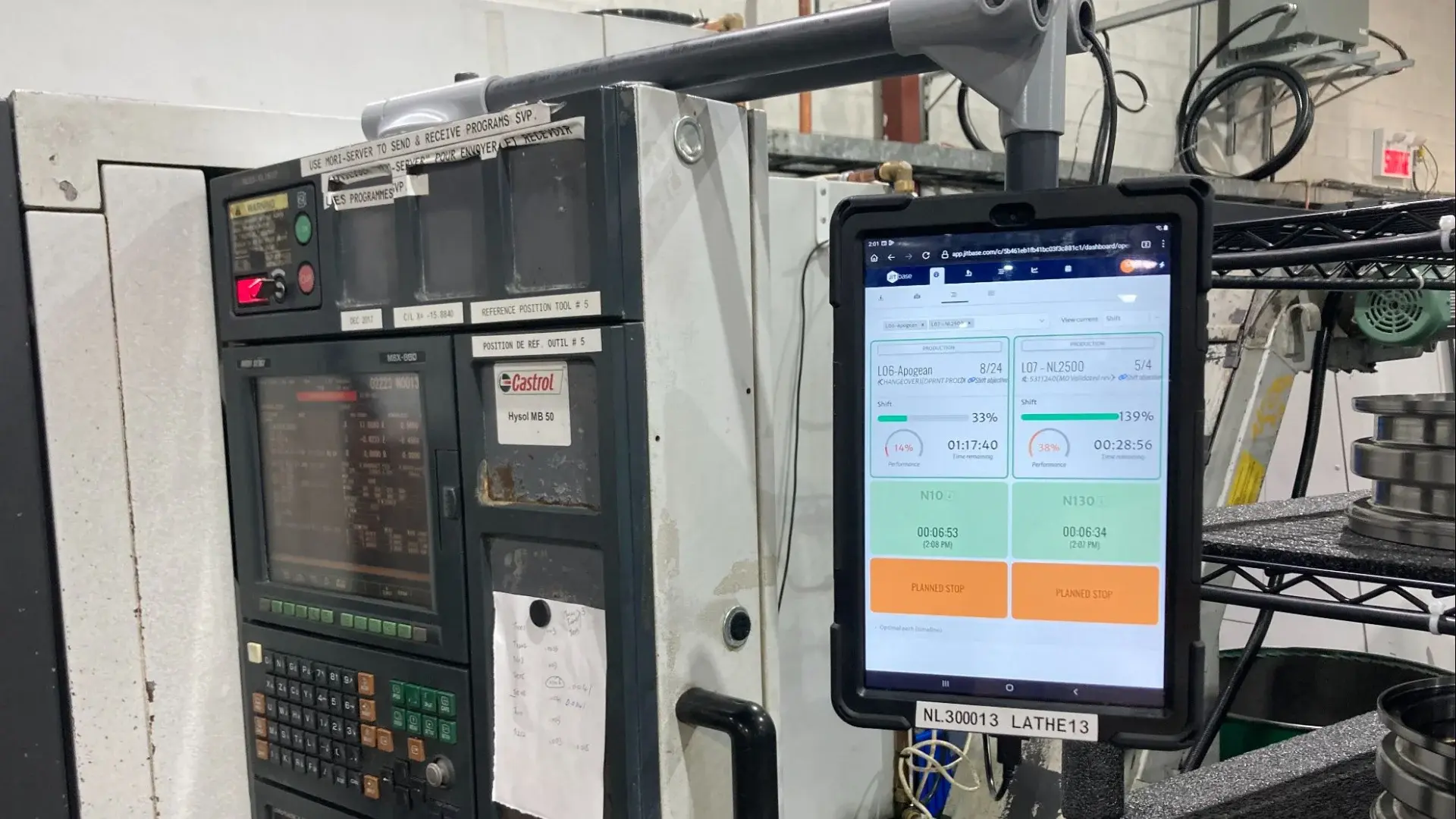
JITbase records stop reasons at the machine, so breakdowns and planned stops are separated from the start.
Step-by-Step: How to Calculate MTBF From Shop-Floor Data
The math for MTBF is simple. The hard part is deciding which hours and which failures belong in the count. Start with the formula, then settle what counts as a failure.
The Basic MTBF Formula and Intuitive Meaning
MTBF (mean time between failures) = Total observed operating time / Number of failures
For CNC machines, “operating time” usually means time the machine was available for production and actually in service during the observation window. Some shops use run time only. Others use production-available time minus planned downtime. What matters is consistency across machines and reporting periods.
If a machine ran for 400 observed operating hours and had 4 qualifying failures, its MTBF is 100 operating hours. In plain language, that means the machine failed once every 100 production hours on average during the period studied.
To see how better event quality affects this calculation, shops often review methods for automated downtime detection, especially when manual stop coding is inconsistent.
A short video at the end of this guide walks through the same logic and the data fields involved.
What Counts as a Failure?
Before counting anything, write down what a failure means in your shop. A simple rule works for most CNC shops:
-
Count: unplanned stops that take the machine out of production, such as a spindle fault, a coolant pump failure, or a door interlock fault.
-
Don’t count: setups, breaks, planned maintenance, and scheduled changeovers.
-
Count once: one real stop can trigger several alarms within seconds, but it is still one failure.
Whatever rule you choose, apply it to every machine and every shift. Mixed definitions make the number meaningless.
Worked Example With Simple Numbers
Here is an illustrative example. Mill-01 ran in four stretches over two days:
-
Day 1, morning: 4 hours of production, then a breakdown (25 minutes)
-
Day 1, afternoon: 4 hours of production
-
Day 2, morning: 3 hours of production, then a breakdown (40 minutes)
-
Day 2, afternoon: 5 hours of production
Total operating time is 4 + 4 + 3 + 5 = 16 hours, and there are 2 failures. So:
MTBF = 16 / 2 = 8 operating hours
The 25 and 40 minutes of repair time aren’t part of the operating time. They belong to MTTR, which measures how long recovery takes. And 8 hours doesn’t mean the next failure will happen exactly 8 hours from now. It’s an average based on past observations in the selected window.
Machines With No Failure Yet
Now suppose Mill-02 ran 30 hours during the same week and had no failure. That machine’s data still matters: it adds evidence that the asset can run without failing, even though there is no completed failure interval in the period. Many shops report a simple MTBF while also flagging low sample counts. The first win is just to stop ignoring the operating time of machines that haven’t failed yet.
Pooling the two machines gives (16 + 30) / 2 = 23 operating hours per failure for the group. That’s a group-level MTBF, not a measure of either machine alone, so Mill-01 should still be reported separately at 8 hours.
How JITbase Supplies the Data Behind MTBF
Everything above can be done in a spreadsheet, and many shops start there. The weak point is the data: stop reasons typed in after the fact, duplicate alarms, and planned stops mixed in with real failures. JITbase is built to remove that manual step.
On the screen at the machine, operators record the reason for stops. That tells the system whether a stop was a breakdown or a planned stop such as a setup, a break, or a changeover. The result is a stop history that already separates unplanned failures from planned stops, with the operating time of each machine alongside it. Those are the two inputs the MTBF formula needs, and from there the calculation itself takes a few minutes in a spreadsheet.
Two practical benefits follow from that approach:
-
Consistent definitions: Stop reasons are recorded at the moment the stop happens, so a failure means the same thing on every shift instead of being reconstructed later.
-
Less manual rebuilding: The data needed for MTBF is already being collected, so there’s much less to copy into a spreadsheet before each maintenance review.
Shops that want to see how stop data is captured can look at machine monitoring. The downtime root cause analysis guide shows what to do with the stops once they are categorized.
See the data behind MTBF on your own machines
Book a short demo to see how stops are recorded at the machine and how that data supports MTBF and other reliability metrics.
What Shop-Floor Data Sources Contain the Events You Need
Once you know the formula, the real work is getting clean data. At a minimum, you need a timestamp, a machine ID, an event type or machine status, and a stop record that explains what happened. A simple readiness checklist can help before rollout. The integrate shop floor data checklist is useful for confirming that the right fields are collected consistently.
Most CNC shops already have some of the data needed for mean time between failures. The challenge is that it often lives in several places and at different levels of detail.
Machine Event Logs and PLC Outputs
CNC controller logs, PLC events, and machine state signals are usually the best source for timestamps. These records may include alarm codes, start/stop events, feed hold, cycle complete, machine ready, servo faults, and emergency stop conditions. High-frequency event streams are precise, but messy. A single electrical issue can generate multiple events within seconds.
Useful fields to capture include:
-
Timestamp
-
Machine ID
-
Event code or alarm code
-
Event type
-
Duration, if available
-
Job or part ID
-
Shift or operator context
For operating-time totals, program and cycle data also matter. Shops trying to extract accurate cycle times can improve the run-hour side of the MTBF equation, especially where raw logs don’t clearly distinguish cutting time from idle-ready time.
Maintenance Records and Work Orders
Maintenance logs tell the other half of the story. They show what actually failed, what was repaired, how long the machine was down, and whether the event was mechanical, electrical, tooling-related, or process-related. A controller alarm alone may not tell whether the failure was a bad sensor, worn toolholder, or operator-caused crash.
Operator Reports and Manual Stop Tickets
Manual stop tickets are less precise but often contain the best reason data. Operators can record “coolant pump failed,” “door interlock fault,” or “probe error during setup,” which makes later classification much easier. The trade-off is consistency. One shift may log “alarm,” another may log “maintenance,” and a third may write nothing.
Sensors and IIoT Status Streams
Low-cost sensors and IIoT collectors can improve event detection where controller access is limited. They can capture machine power state, spindle load changes, cycle signals, or stack-light status. But signal-based inference needs validation. A red light may mean a true failure, or just a planned stoppage. That’s why many shops run a short pilot and compare automated capture with operator notes or maintenance records.
Preparing and Cleaning Shop-Floor Data Before Calculating MTBF
Bad inputs produce a clean-looking but misleading MTBF. So data prep isn’t busywork. It’s the calculation.
Standardizing Timestamps and Timezones
Start by converting all timestamps to one timezone and one format. This sounds basic, but mixed controller clocks, daylight saving changes, and maintenance entries keyed in later can throw off event order. Also standardize machine identifiers. “VF2,” “VF-2,” and “Mill 3” shouldn’t be treated as different assets if they refer to the same machine.
Classifying Failure Events and Counting Each Stop Once
Next, define a list of failure types. Some shops include only machine-originated faults. Others include tooling failures that stop production. Either choice can work, but the rule has to be consistent. Then merge clustered events. If one spindle drive issue produces five alarm lines in 20 seconds, count that as one failure event, not five.
Planned downtime should usually be excluded from both the failure count and the operating-time total if the purpose is equipment reliability. That includes scheduled preventive maintenance, planned setup time, and known changeover windows, unless the shop has a different internal standard.
Missing Data and Machines With No Failure Yet
Missing reason codes don’t always block analysis. A shop can still calculate MTBF from operating hours and confirmed failure counts, then improve classification later. But missing timestamps are more serious because they affect event boundaries.
The piece many small shops skip is the machines that haven’t failed yet. A machine that ran the whole period without a failure still contributes useful operating time, so don’t drop it. Mark those records clearly so they aren’t mistaken for missing data. If a shop wants a more formal statistical treatment later, a reliability engineer can help, but a clearly labeled dataset is the first step.
How to Use MTBF Results in Maintenance and Production Planning
Once the number is calculated, the real question is what to do with it. A raw average won’t fix scheduling unless it changes decisions.
Translating MTBF Into Inspection or Preventive Intervals
A low or falling MTBF can trigger inspection reviews. If a machine has repeated electrical stops roughly every few dozen operating hours, it may justify a targeted inspection before another heavy production run. But don’t set preventive intervals from MTBF alone. Compare the result with actual failure modes, vendor maintenance guidance, and technician notes. Shops often pilot a revised interval on one machine or one subsystem before changing the whole PM schedule.
Using MTBF to Size Spare Parts and Set Reorder Points
Spare-parts policy is another practical use. If repeated failures involve the same sensors, pumps, relays, or connectors, MTBF trends can support a stocking decision. The number still needs failure category detail. A single blended MTBF across all failure modes isn’t enough to decide what parts to hold.
Communicating Reliability Findings to Production Planners
Planners usually need a planning message, not a reliability lecture. That message might be: “Machine A has twice the failure frequency of Machine B over the last quarter, and recovery time is also longer.” That can influence routing, overtime risk, and which jobs should avoid a marginal machine.
If a shop wants to integrate CNC data with ERP, MTBF and related downtime data can be passed into planning reviews, spare-parts discussions, or weekly capacity meetings. General maintenance guidance such as Limble’s overview of MTBF and related practices can also help. Just base shop-specific decisions on local failure history, not generic benchmarks.
Limitations and Common Pitfalls When Applying MTBF to CNC Machines
MTBF is useful. It’s also easy to misuse.
When MTBF Can Be Misleading
First, mixed failure modes can hide the real issue. A machine that has rare but severe spindle faults and frequent nuisance sensor trips may show one blended MTBF, even though the maintenance response should be completely different. Second, equipment life stages matter. New components may have early failures, while older assets may drift into wear-out behavior. A single average across both periods can blur the pattern.
Small samples are another trap. One failure in a short month doesn’t support a strong conclusion. Nor does a no-failure month prove the machine is “fixed.” And shops often disagree on what counts as failure. Is a broken tool a reliability event? What about a probing fault caused by bad fixturing? Reasonable teams can define this differently, but they shouldn’t mix definitions in the same metric.
Alternatives and Complementary Metrics (MTTR, Failure Rate)
MTTR adds repair duration. Failure rate shows event frequency per hour or cycle. Availability combines uptime and repair impact. Some reliability teams also plot how failure probability changes over time, instead of compressing everything into one average.
That broader view is why many shops present MTBF beside downtime minutes, failure category counts, and OEE trends on the same screen. A metric stack gives better decisions than a single number. Shops building real-time OEE dashboards often find that reliability metrics make more sense once operators and planners can see them in the same context.
MTBF vs MTTR and Other Reliability Metrics: Comparison Table
MTBF and MTTR answer different questions. MTBF shows how often a machine fails, and MTTR shows how long it takes to get it running again. Reading them together shows whether a problem is frequent failures, slow repairs, or both.
| Metric | Definition | When to use | Data required | Limitations |
|---|---|---|---|---|
| MTBF | Average operating time between failures for repairable assets | Repairable machines with repeat failures | Machine ID, operating time, failure count, timestamps | Hides failure mode differences, sample-sensitive |
| MTTR | Average time to restore function after failure | Maintenance efficiency, schedule recovery | Failure start, repair complete, machine ID, work order | Says nothing about failure frequency |
| MTTF | Average time to failure, often used for non-repairable items | Consumables or replace-only components | Start of service, failure time, component ID | Less suitable for repairable CNC assets |
| Failure rate | Failures per unit time or cycle | Comparing event frequency directly | Failure count, exposure time or cycles | Less intuitive for many shop users |
| Availability | Share of time equipment is able to perform its required function | Production planning, uptime tracking | Uptime, downtime, MTBF, MTTR, schedules | Can mask the cause of losses |
Practical, Low-Cost Workflows for Small CNC Shops to Collect MTBF-Ready Data
A shop doesn’t need a large software project to start collecting usable reliability data. The first version can be very simple.
Minimal Hardware and Manual Procedures That Work
A workable low-cost setup often includes a daily machine log, consistent failure reason codes, operator stop tickets, and a weekly spreadsheet rollup. Hourly checks can work if automated timestamps aren’t available, though they’re less accurate for short stops. The main goal is consistency: same machine names, same stop categories, same time basis.
Shops that want a practical starting point can review how to implement cycle time monitoring using minimal hardware. The same timestamp discipline supports MTBF.
Scaling Up: Automated Event Detection and Integration Tips
The next step is usually exporting controller logs, monitoring simple I/O signals, or using a small data collector to capture run/stop status. Manual classification still matters, but automatic timestamps reduce guesswork. Some shops also look for ways to automate manual interventions so data doesn’t depend on someone remembering to type a note after a stressful breakdown.
If data needs to move into scheduling or maintenance systems, start with a pilot on one machine family. Validate event accuracy first. Then map the fields to work orders, asset IDs, and planner reports.
Checklist to Validate Data Readiness
Before calculating MTBF shop-wide, confirm these basics:
-
Consistent timestamp format across sources
-
Unique machine IDs
-
Clear failure definition
-
Planned downtime labeled separately
-
Duplicate alarms collapsed into single incidents
-
Observation window long enough to include meaningful operating time
-
Maintenance records linked to machine events where possible
Start with one machine group
Pick a pilot group, record breakdowns for a few weeks, and review the first MTBF with your maintenance team.
The Bottom Line
MTBF is useful because it turns machine reliability into a number planners and maintenance teams can actually discuss, but the number only works if the shop defines failure clearly and measures real operating time. Start with a short audit of current logs, run one pilot calculation on a small machine group, and review the result with maintenance before changing any schedule. A good MTBF process is simple, consistent, and paired with MTTR and downtime reasons.
Video: What Is MTBF (Mean Time Between Failure)
For a visual walkthrough of these concepts, check out this helpful video:
Frequently Asked Questions
How long should the observation window be for CNC MTBF?
It depends on machine utilization and failure frequency. The window should be long enough to include meaningful operating time and more than a handful of failures. For a heavily used production machine, a month may give an initial view, while a lower-use machine may need a quarter or longer.
The more important rule is consistency. Compare machines over the same window, report the observed operating hours and failure count next to the MTBF, and avoid reading a single short window as a trend. If a machine had only one failure in the period, treat the result as a starting point rather than a conclusion.
What’s the difference between MTBF and MTTF?
MTBF usually applies to repairable assets, such as CNC machines that return to service after a fault. It measures the average operating time between one failure and the next. MTTF (mean time to failure) is more often used for non-repairable items or components treated as replace-only parts.
In shop practice, a spindle drive relay that gets replaced when it fails might be tracked with MTTF, while the machine as a whole is tracked with MTBF. Using the right term matters when comparing numbers from suppliers, maintenance software, and internal reports, because they may not be measuring the same thing.
What’s the difference between MTBF and MTTR?
MTBF measures how often a machine fails: the average operating time between one failure and the next. MTTR (mean time to repair) measures how long it takes to restore the machine to production after a failure. One describes frequency, and the other describes recovery.
Reading them together gives a clearer picture. A machine with a high MTBF but a long MTTR fails rarely but is costly when it does, while a machine with a low MTBF and a short MTTR fails often but recovers quickly. Each case points to a different fix, such as spare parts and repair skills in the first case or root-cause work in the second.
Should planned downtime be included in MTBF?
Usually no. Planned maintenance, scheduled setups, breaks, and approved changeovers are commonly excluded because MTBF is meant to describe unplanned failure behavior. Counting them as failures would make a healthy machine look unreliable.
If a shop chooses a different rule, it should apply that rule consistently and document it so comparisons stay valid. Recording planned and unplanned stops under separate reasons at the machine makes this easy, because the split is made when the stop happens rather than reconstructed later.
What should a shop do if failure data is sparse?
Sparse data is common, especially for newer or lightly used machines. Keep collecting operating-time exposure, mark non-failure periods clearly, and avoid strong conclusions from a tiny sample. A machine that has not failed yet still contributes operating hours to the calculation.
In reporting, show the MTBF estimate beside total observed hours and failure count so readers can judge how much to trust it. Grouping similar machines can also help, as long as the group-level number is labeled as such and each machine is still reviewed separately.
Can MTBF alone drive maintenance schedules?
No. MTBF is best used as one input. Maintenance timing should also reflect failure mode, safety risk, repair duration, OEM guidance, production demand, and technician judgment.
A shop that changes preventive intervals based only on one average may fix the wrong problem or create unnecessary downtime. A safer approach is to pilot a revised interval on one machine or one subsystem, then review the next few weeks of failure data with the maintenance team before rolling it out more widely.
Related Articles