

In a CNC shop, operators rarely stand in front of one machine waiting for the cycle to end. While the spindle runs, they inspect the previous part, deburr, prepare the next blank, preset a tool or reload a bar feeder. These are hidden-time tasks. They cost nothing as long as they fit inside the cycle. But as soon as they run over, or two machines need the operator at the same moment, the machine waits and the schedule slips. And most schedules cannot see them. This guide explains how to inventory these tasks, calculate the real workload they represent and build them into your shop’s schedule.
Key takeaways:
- A hidden-time task is done while the machine is cutting. It costs nothing as long as it ends before the cycle does.
- ERP systems and routings mostly plan machine time. The operator workload behind these tasks stays invisible, which is why machines end up waiting for their operator.
- The method: inventory tasks with their frequency, check that they fit inside the cycle, place them in the schedule, then track the gap between planned and actual.
What is a hidden-time task? Definition and CNC examples
Hidden time is the time during which the machine runs on its own. An operator task is a hidden-time task (also called external work) when it happens during that time: it does not lengthen the cycle, provided it ends before the machine needs the operator again.
By contrast, an internal task stops the machine: loading and unloading the part (the core of manual machine tending), intervening on an M00 programmed stop, setting up for a changeover.
| Task | Example | Usual type |
|---|---|---|
| Dimensional inspection | Measuring the previous part at the inspection bench | Hidden time |
| Deburring and hand finishing | Breaking edges, cleaning the part | Hidden time |
| Preparing the next job | Blanks, fixturing, paperwork | Hidden time |
| Tool presetting | Measuring tools off the machine | Hidden time |
| Reloading | Bar feeder, robotic cell | Hidden time if anticipated |
| Loading and unloading | Opening the door, clamping the part | Internal |
| M00 programmed stop | Mid-cycle inspection, flipping the part | Internal |
The same task can switch categories. An inspection done at the machine with the door open is internal. The same inspection moved to a measuring station while the next part is cutting becomes hidden time. That is what workstation organization is really about.
Robotic machine tending changes this split without removing it. The robot handles loading and unloading, but refilling its part supply, reloading bar feeders and inspecting parts remain operator tasks, and they still need a window in the schedule.
Why hidden-time tasks slip through the schedule
ERP and MRP systems mostly plan in machine hours, based on routings. A routing may include a labor time, but it rarely says what matters most: is that work done while the machine is cutting or while it is stopped, and in which window of the cycle? So the schedule implicitly assumes an operator can keep up with their machines without constraint.
On the shop floor, three situations break that assumption:
- The task takes longer than the cycle. The machine finishes and waits for the operator to complete the inspection.
- Two machines finish at almost the same time. One of them has to wait.
- A periodic task lands at the wrong moment. An inspection every ten parts or a worn-tool change adds to an already full cycle.
In all three cases, the stop shows up in machine monitoring as plain idle time, with no visible cause. Teams then look for a machine problem when the real issue is operator workload.
Step 1: inventory hidden-time tasks at each workstation
Observe each workstation over several representative periods: start of shift, stable production, part changeover. For each task, record:
- what it is and where it is done (at the machine or next to it);
- its trigger: every part, every n parts, every tool change, every job;
- its average duration, measured over several occurrences;
- whether it gates the machine restart or can wait.
Frequency is the most often overlooked factor. A 4-minute inspection done on one part in three does not weigh the same as one done on every part. To choose the right metrics, see our guide to measuring operator workload in CNC shops.
The machine times you use must be reliable too, ideally drawn from programs and actual cycles rather than theoretical routings. Our method to extract cycle times from G-code covers this step.
Step 2: check that tasks fit inside the cycle
A task is truly hidden if it takes less than the machining time remaining when it starts. For a multi-machine operator, the check is a workload calculation across all of their machines:
Operator workload (%) = operator time required over the period ÷ length of the period × 100, across all machines.
Illustrative example: an operator runs two lathes. Each cycle is 12 minutes of cutting plus 2 minutes of loading, so one part every 14 minutes per machine. For each part, the operator loads (2 minutes, internal), inspects (4 minutes) and deburrs (3 minutes), both in hidden time. That is 9 minutes of work per machine every 14 minutes, or 18 minutes for two machines: a 129% workload. The machines will wait for their operator on every cycle.
If the quality plan allows inspecting one part in three, inspection drops to about 1.3 minutes per part. Workload falls to about 12.7 minutes out of 14, close to 90%. The inspection has not disappeared: its frequency has changed. But at 90%, there is little margin left, and the slightest drift will create waiting time.
Put hidden-time tasks into your schedule. Model inspections, tool changes and reloads as operator tasks that JITbase schedules alongside machine cycles.
Discover Operator TasksStep 3: build hidden-time tasks into the schedule
Once inventoried and quantified, tasks need to appear in the schedule next to machine time:
- Place each task in the cycle window that makes it possible, taking its frequency into account.
- Stagger cycle end times on machines run by the same operator, so two machines do not call for them at once.
- Prioritize tasks that gate a restart (loading, reloading) over those that can wait (deburring a finished job).
- Recalculate assignments whenever a cycle changes: new part, new tool, new program.
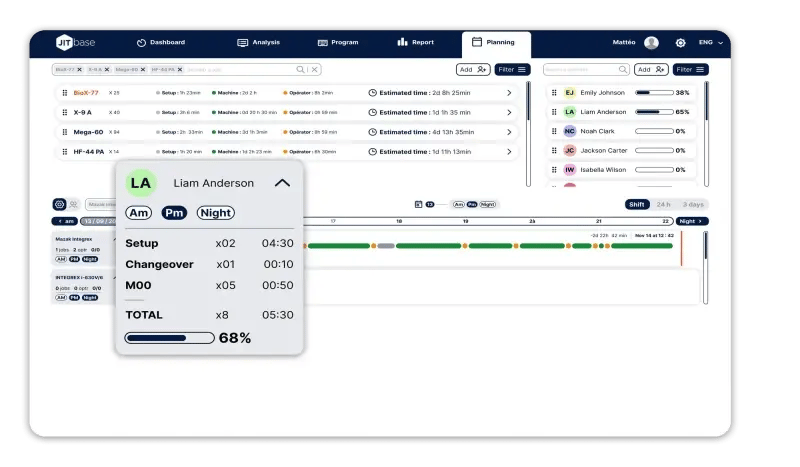
Done by hand, this kind of operator workload management quickly breaks down beyond two or three machines per operator. In JITbase, the Operator Tasks feature models these interventions: quality checks, tool changes, robot reloads, light maintenance. Tasks can run in parallel with machine cycles or be triggered automatically by machine events. They are inserted into the live production schedule, displayed on the operator interface and included in both operator workload and OEE calculations. Setups, changeovers and M00 stops are derived from CNC programs and machine history. The schedule then shows whether the manual tasks of several machines actually fit together for a single operator.
Step 4: track the gap between planned and actual
Actual durations drift: a part that is harder to deburr, an inspection that has to be redone, a tool that cannot be found. To keep the schedule credible, track a few simple metrics:
- machine waiting time attributable to the operator, by workstation and by shift;
- the share of hidden-time tasks finished before the cycle ends;
- planned versus actual operator workload;
- actual task durations versus their standard durations.
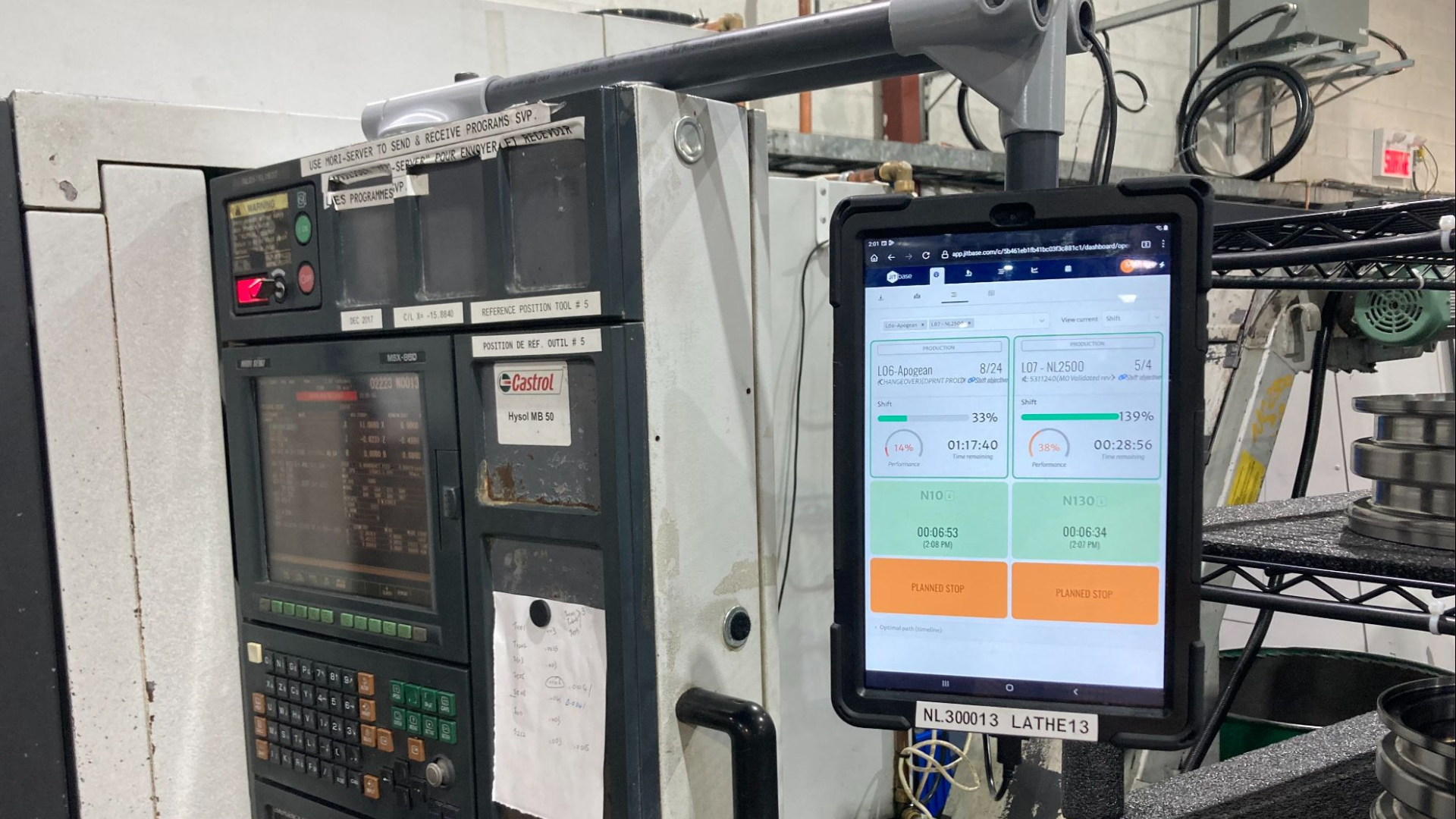
This data comes from two sources. The machine reports when it stops and when it restarts. The operator confirms tasks and enters downtime reasons on the screen at the machine. With JITbase, when a manual operation takes longer than expected, the short-term schedule is recalculated in real time.
First-part inspection is a special case, because it is often done with the machine stopped. Our guide to first article inspection in CNC shops explains how to shorten that wait.
See in real time when a machine is waiting for its operator. Track job progress and machine stops live, workstation by workstation.
Discover production monitoringMoving tasks from internal to hidden time
The most profitable lever is taking work out of machine downtime, following the same principle as SMED for setups:
- Prepare blanks, fixturing and paperwork for the next job while the current job is running.
- Preset tools off the machine rather than on it.
- Move inspections that allow it to a measuring station, while the next part is cutting.
- Reduce or group M00 stops when mid-cycle inspection is no longer needed, in agreement with quality and programming.
- Adjust lot sizes to space out changeovers.
Every minute moved from internal to hidden time is a minute of machine time recovered, provided the operator has the capacity to absorb it. That is why you check workload (step 2) before moving work.
Common mistakes
- Thinking “one operator, one machine.” As soon as an operator runs several machines, what counts is the sum of their tasks, not each machine’s cycle in isolation.
- Forgetting periodic tasks. Inspections every n parts and worn-tool changes are invisible in an observation that is too short.
- Scheduling with theoretical times only. If cycle times or task durations are wrong, the workload calculation is wrong too.
- Imposing task confirmation without explaining it. Operators may experience it as surveillance. See our guide to shop-floor change management.
Put a number on the capacity you can recover. Estimate the return on investment of JITbase for your shop.
See the return on investmentConclusion
Hidden-time tasks are real work, even when they cost no machine minutes. As long as they stay out of the schedule, they turn into waiting time nobody can explain. Inventorying them with their frequency, checking that they fit inside the cycle and placing them in the schedule is often enough to eliminate a large share of the stops wrongly blamed on machines.
FAQ
What is the difference between hidden time and internal time?
A hidden-time task is done while the machine is cutting on its own: inspecting the previous part, deburring, preparing the next job. It does not lengthen the cycle as long as it ends before the machine needs the operator. An internal task, such as loading the part or an M00 programmed stop, keeps the machine stopped for its entire duration.
The boundary depends on how the workstation is organized more than on the task itself. A dimensional inspection done at the machine with the door open is internal. Done at a measuring station while the next part is cutting, it becomes hidden time. That is why the inventory must record where and when each task is done, not just how long it takes. Moving a task from internal to hidden time directly gives back machine time, provided the operator has the capacity to absorb it.
How do you know if an operator can run one more machine?
Add up all the operator time required by their machines over a given period: internal tasks and hidden-time tasks, taking their frequency into account. Divide by the length of the period. Above 100%, machines will inevitably wait. Between 85 and 100%, the margin is thin and the slightest drift creates waiting time.
Illustrative example: two lathes each produce one part every 14 minutes, with 9 minutes of operator work per part per machine. Workload reaches 129%, so assigning a third machine to that operator makes no sense until the tasks are reorganized. Also check cycle synchronization: two machines that finish at the same time create waiting time, even when average workload stays below 100%.
Do hidden-time tasks have to be entered by hand?
Not entirely. Stops and restarts come straight from the machine, and part of the time data (setups, changeovers, M00 stops) can be derived from CNC programs and machine history. The operator only has to confirm tasks and enter downtime reasons on the screen at the machine, which keeps input down to a few taps.
At the start, a manual time study over a few days is still useful to establish reference durations and the frequency of each task. After that, the goal is to ask operators only for what the machine cannot know: which task they are doing and why the machine is stopped. An interface that takes several screens for a frequent action will be bypassed, and the data will lose its value. Explaining to operators what these confirmations are for also helps them accept the process.
Does hidden time count in OEE?
A truly hidden task does not reduce OEE, since the machine keeps producing. It does as soon as it runs over: the machine stops while waiting for the operator, which hurts availability. JITbase includes operator tasks in both operator workload and OEE calculations.
In conventional machine monitoring, this waiting time shows up as a stop with no clear cause, or a poorly coded one. Teams then look for a technical problem when the real issue is operator workload. Linking these waits to the tasks that cause them makes it possible to choose the right action: stagger a cycle, review an inspection frequency with quality, move a task off the machine or reassign a machine to another operator.